Get more from SOLIDWORKS with a free Health Check
Free consultancy session Available whoever supplies your SOLIDWORKS licences Remote or onsite
A prioritised list of what to fix, and how
A free 2–3 hour session with a TECHNIA SOLIDWORKS specialist. We review how your team actually works (assemblies, drawings, templates, data management) and give you a prioritised list of what to fix and how.
Most lost engineering time is invisible from the inside
Teams do not lose hours because they lack SOLIDWORKS skill. They lose them because habits formed years ago are still running, and nobody has stood outside the workflow to look at it. A SOLIDWORKS Health Check closes that gap in one session.
|
WORKING WITHOUT REVIEW
|
|
AFTER A SOLIDWORKS REVIEW
|
|
|
|
Familiar problems stay invisible When the same workflow runs every day, its costs stop registering as costs. |
Named problems, ranked by what they cost An outside specialist turns habits into a list you can act on. |
|||
| Assemblies rebuild slowly and everyone works around it | Performance issues traced to their actual cause | |||
| The same manual steps repeat on every project | Repetitive work identified for automation | |||
| Templates and properties differ by engineer | One agreed standard for templates and libraries | |||
| Licensed capability sits unused because nobody knows it is there | Quick wins separated from longer term work | |||
See where your team can work smarter
Whether your focus is modelling speed, drawing consistency or data management, the SOLIDWORKS Health Check examines the three areas that decide how much value you get from SOLIDWORKS.

Workflows
How work moves from concept through to production, where time leaks out, and which steps exist only because they always have.

Standards
Templates, properties, materials, toolbox and libraries. What is defined, what is trusted, and what every engineer quietly does differently.

Data and automation
How files are stored, found and versioned, and where configurations, design tables or macros would remove repetitive work. .
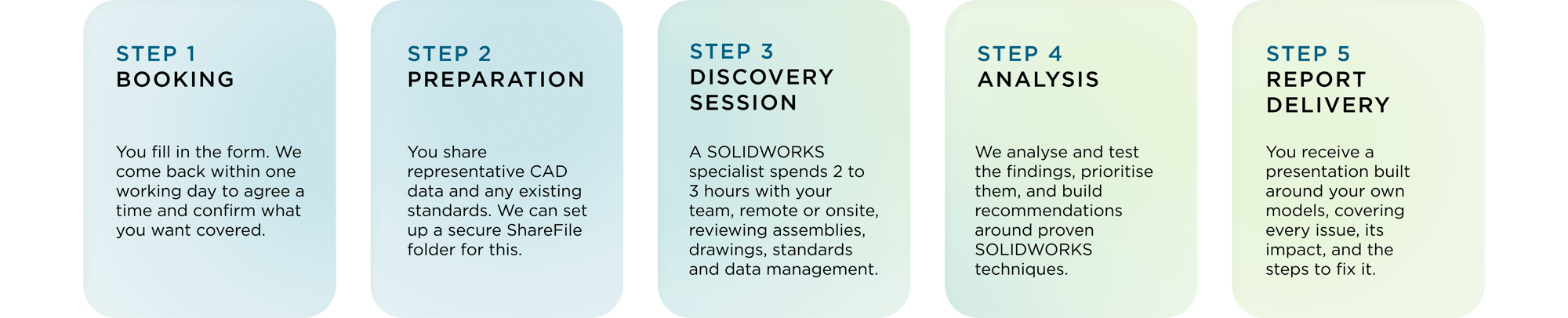
What happens during a SOLIDWORKS Health Check?
Five straightforward steps to a prioritised improvement list, and most of the work is ours. Two to three hours of your time, and the recommendations are yours to keep.

Not ready for an assessment yet?
Download the SOLIDWORKS Health Check Guide to learn how engineering teams uncover inefficiencies, optimise workflows, and get more value from their SOLIDWORKS investment.
✓ Understand what a SOLIDWORKS Health Check evaluates
✓ Spot common workflow and standards issues
✓ Learn how to improve CAD productivity
DELIVERABLE 1
Health Check Presentation
A detailed, customer-specific document structured around issue, solution, and example.
Summary of your current state and key findings
Defined issues and the impact of each one
Step by step recommended solutions
Visual examples using your own models
DELIVERABLE 2
Health Check Session
An optional 30 minute walkthrough with the specialist who ran your session. Advisory only, with no implementation work and no obligation.
Walkthrough of findings and recommendations
Open Q&A with a SOLIDWORKS specialist
Quick wins separated from longer term work
Yours to keep whoever supplies your licences
Book your free SOLIDWORKS Review
Two to three hours with a SOLIDWORKS specialist, and a prioritised list of what to fix. Available whoever supplies your licences.